Live on a real Bitrix24 portal — real prompts, real results

Meet your Bitrix24 AI Assistant
the AI brain for your CRM

Type a plain-English instruction on your phone. The assistant reads it, works inside Bitrix24, and hands you back verified results — from a scanned business card to a boardroom-ready dashboard.

Built by FusionETA · Bitrix24 Implementation Partner · Powered by Claude AI
Closed Revenue
RM 1,289,342
▲ 329 deals won
The assistant's chat interface creating a new Bitrix24 contact from a plain-English prompt
Overdue Tasks Found
39 tasks
Grouped by employee, instantly
RM 0
Closed revenue tracked live
0
Open deals monitored in real time
0
Stale deals auto-flagged (7+ days)
0%
Mobile — zero manual data entry
How it works

One conversation. Every part of your CRM.

Sales reps, project managers and executives all talk to the Bitrix24 AI Assistant the same way — in plain English, from a phone, with Claude's remote control running the moment they hit send. Below is a real walkthrough: five phases, every AI prompt used, and the exact Bitrix24 evidence it produced.

📇 Capture a lead
→
🤝 Build the deal
→
📊 Monitor operations
→
📈 Brief the executives
→
💸 Approve the payout
01
Use Case 1 · Lead Capture

From pocket to CRM in one prompt

"Imagine your sales reps are at an exhibition or out meeting clients. Normally, cards sit in pockets for days. Here, the rep takes a photo or pastes a WhatsApp message, and the CRM updates instantly."

1
Business Card Scan
Business card photo used as the input for contact extraction
Input — a photo of the business card, no typing required
⚡
AI Prompt
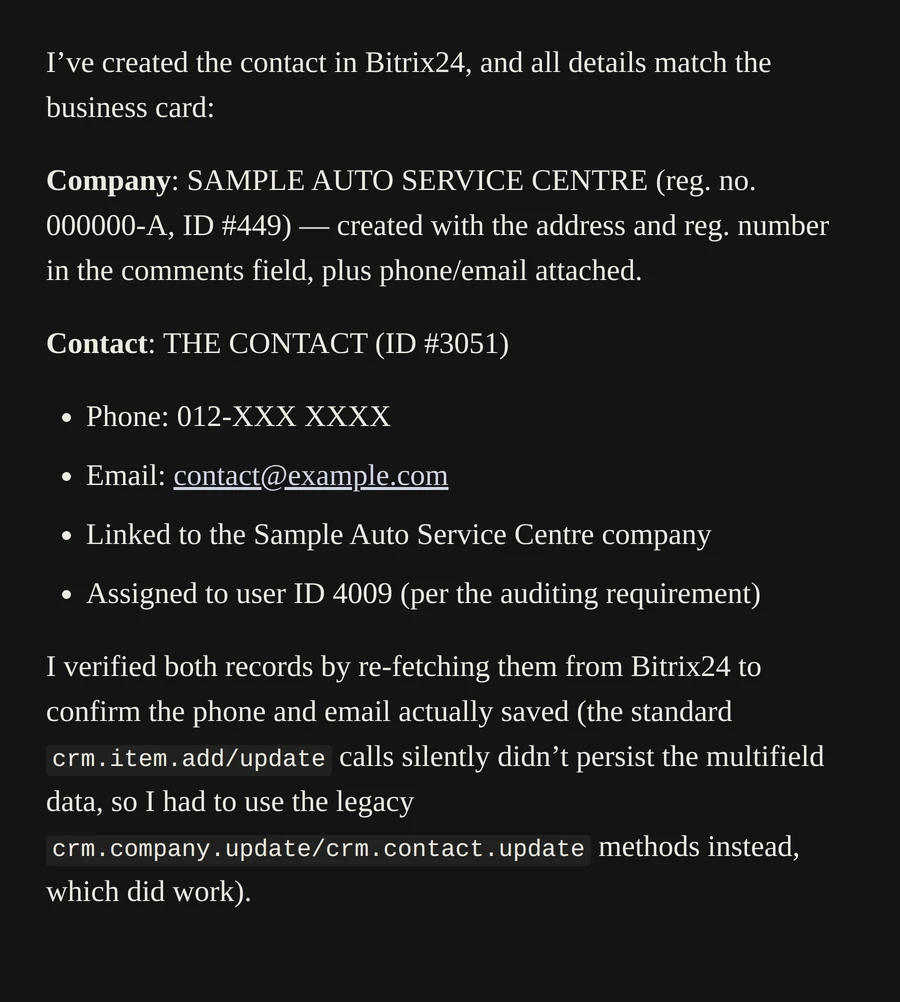
"Extract the contact details from this business card image and create a new Contact in Bitrix24. Match the company name, full name, phone number, and email address."
The assistant confirming a new Bitrix24 company and contact created from a scanned business card
Bitrix24 evidence — company & contact created, verified by re-fetching the record
2
Raw Chat, Unstructured Entry
⚡
AI Prompt
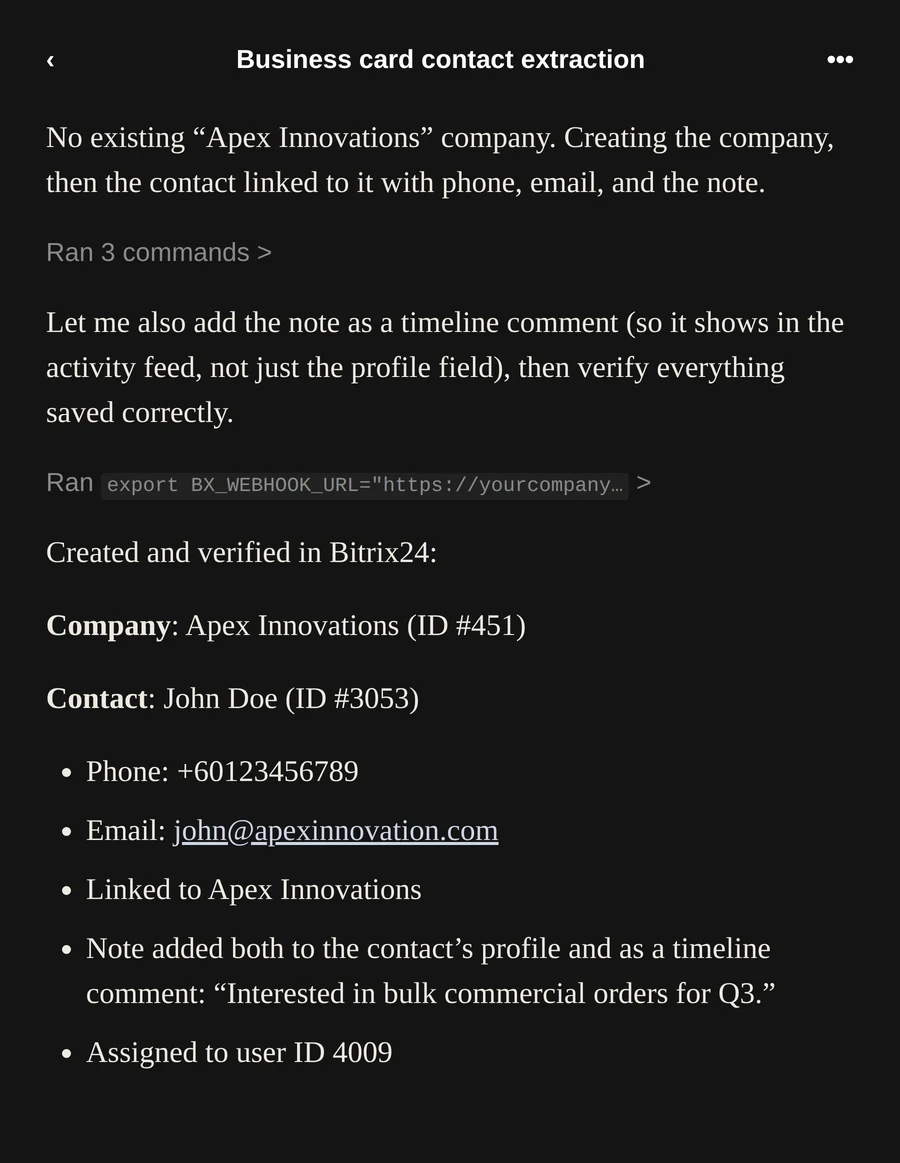
"Create a new contact in Bitrix24 named Apex Innovations, main contact John Doe, phone +60123456789, email john@apexinnovation.com, and add a note: 'Interested in bulk commercial orders for Q3.'"
The assistant's mobile chat creating a company and contact from an unstructured WhatsApp-style message
No existing company found — the assistant created it, linked the contact, and logged the note to the timeline
3
Contact Field Enrichment
⚡
AI Prompt
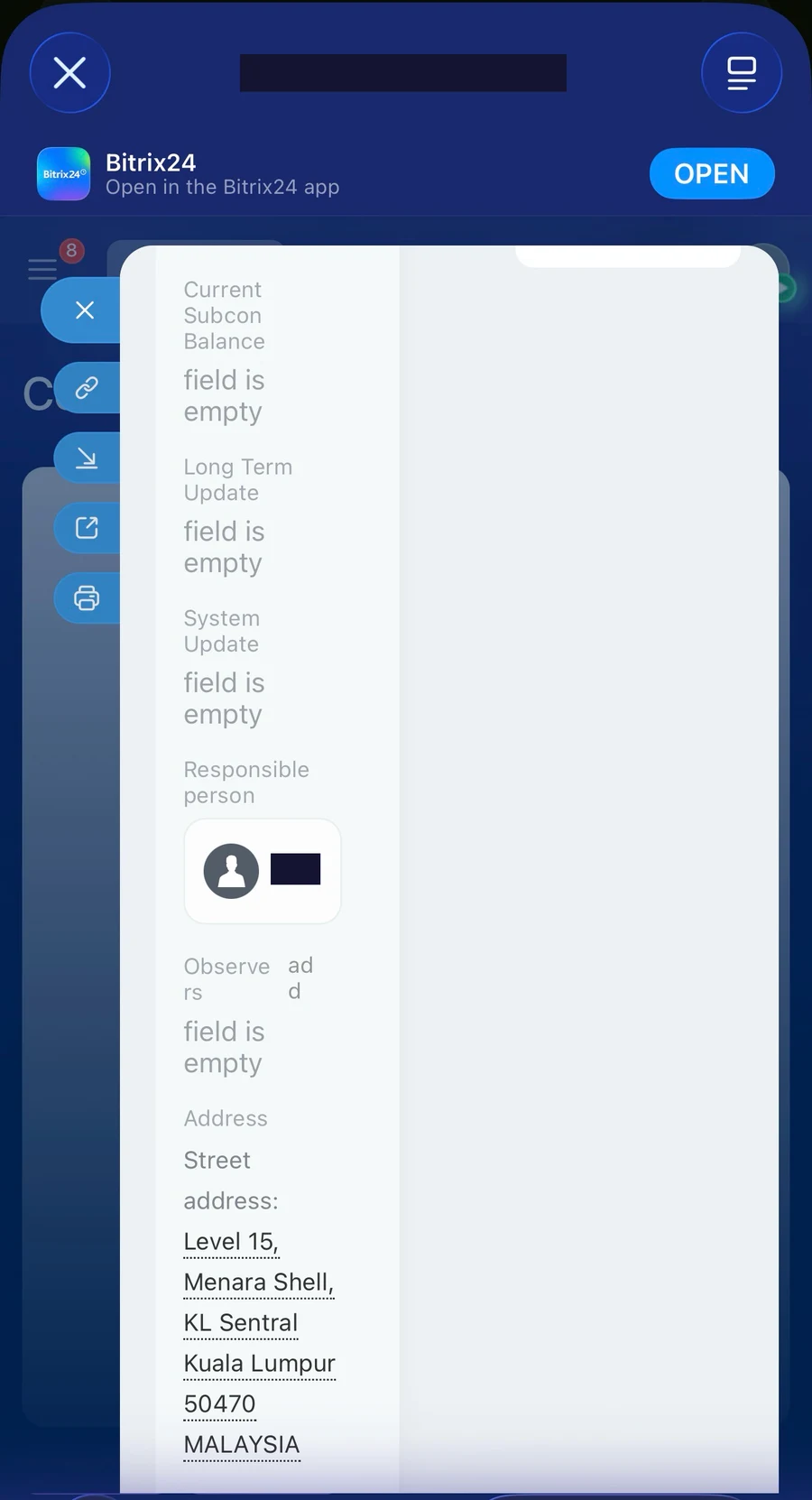
"Update the contact Apex Innovations in Bitrix24. Add their office address: Level 15, Menara Shell, KL Sentral, 50470 Kuala Lumpur."
Bitrix24 mobile app showing the office address field populated on the Apex Innovations contact
Address field updated live in the Bitrix24 mobile app
02
Use Case 2 · Deal Creation & Automated Dispatch

From lead to structured deal — instantly

Once a contact exists, closing deals requires immediate action. Watch the assistant build a pipeline deal, attach product line items, generate official documents, and push them directly to the client.
1
Create Deal & Attach Line Items
⚡
AI Prompt
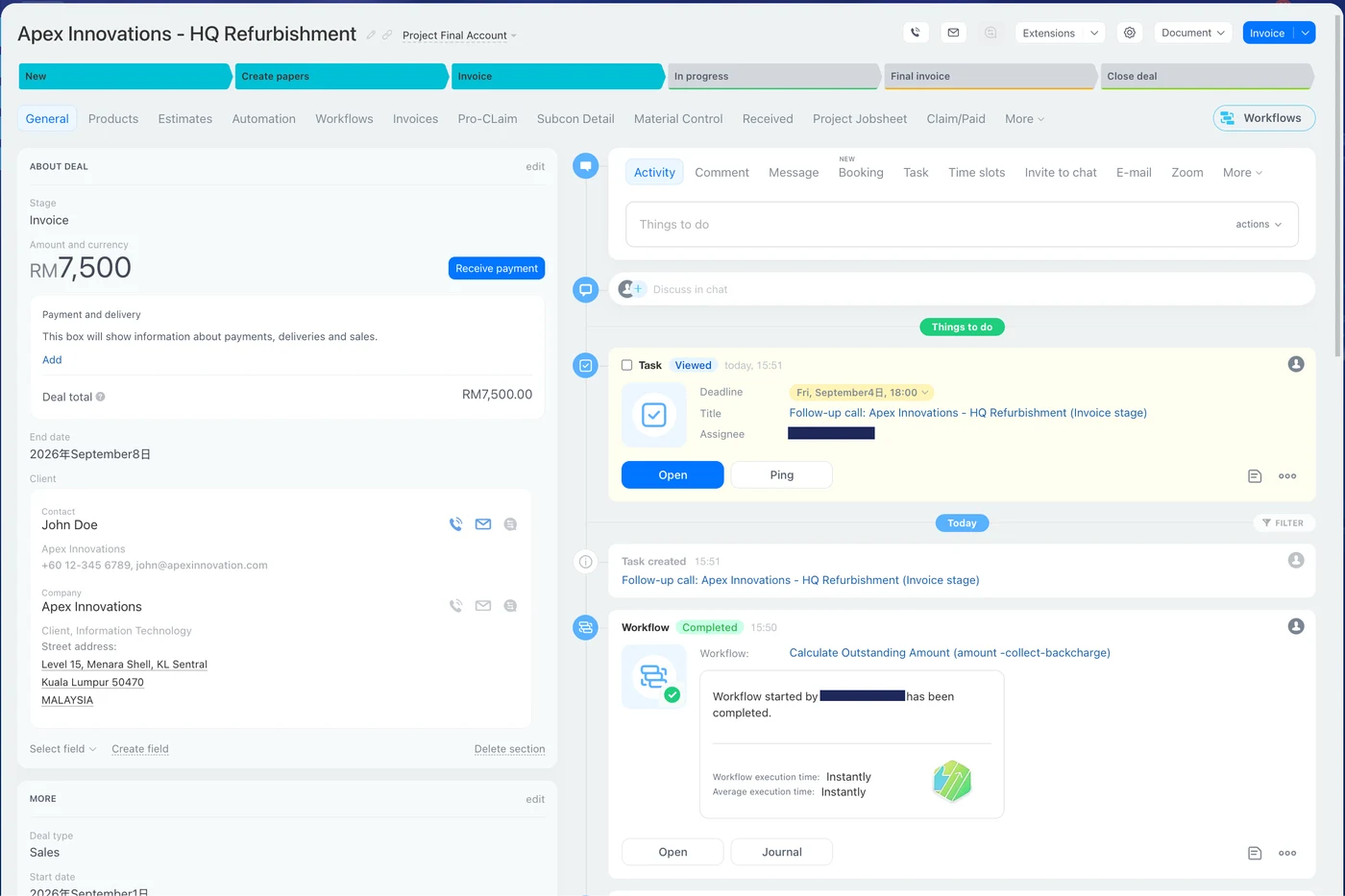
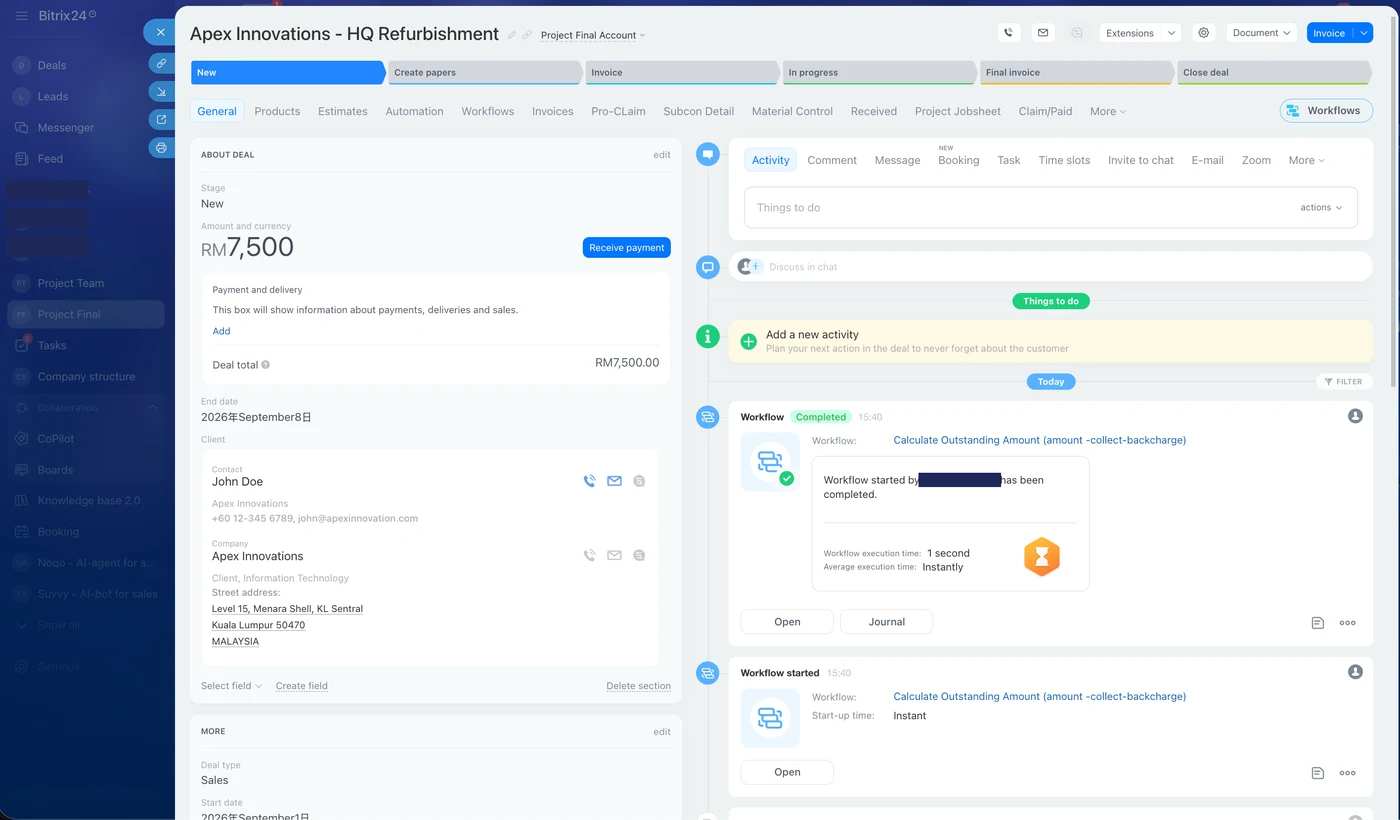
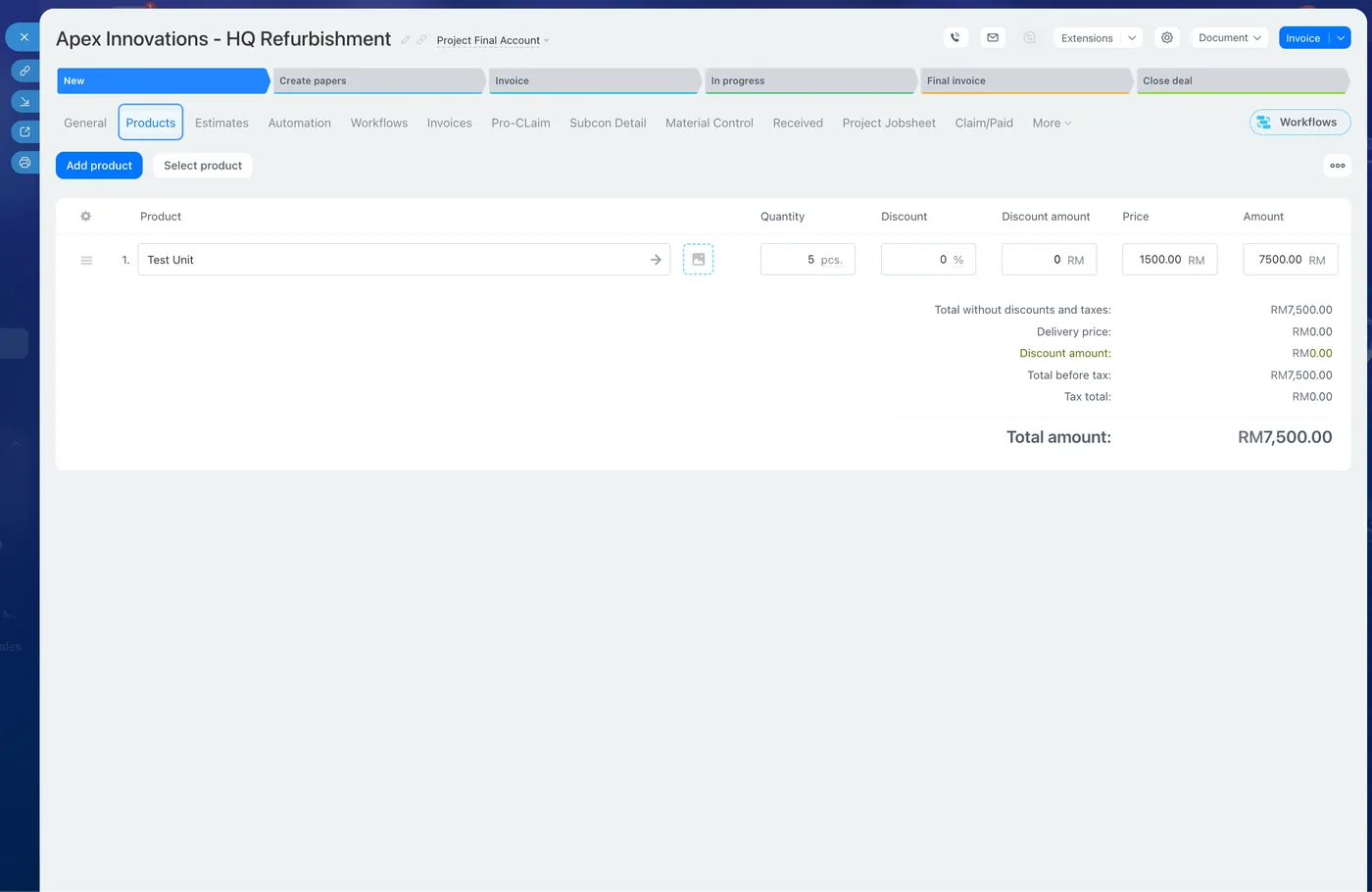
"Create a new Deal titled 'Apex Innovations - HQ Refurbishment' under the General Pipeline in Bitrix24. Link it to contact John Doe from Apex Innovations, set the deal stage to 'New', and attach 5 units of Test Unit into the product."
Bitrix24 deal detail screen for Apex Innovations HQ Refurbishment with automation workflow log
Deal created, contact linked, workflow auto-calculated the outstanding amount
Bitrix24 product line item showing 5 units of Test Unit totalling RM7,500
Product line item attached — 5 units, RM7,500.00 total
2
Stage Progression Automation
⚡
AI Prompt
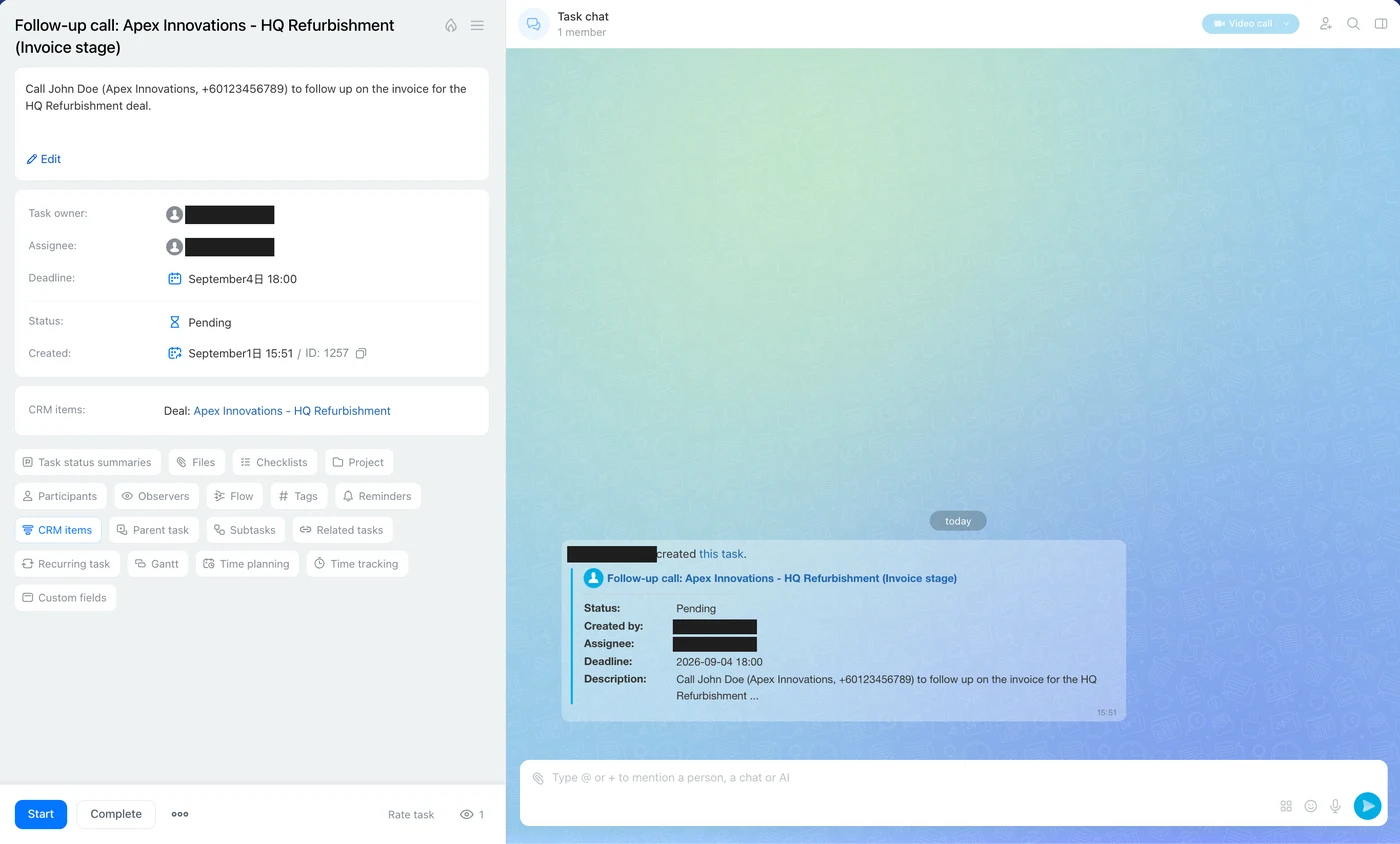
"Move the deal 'Apex Innovations - HQ Refurbishment' to stage 'Proposal / Quote / Invoice' and create a follow-up task for the responsible to call them in 3 days."
Bitrix24 deal moved to Invoice stage with a follow-up task automatically created
Bitrix24 task chat showing the follow-up call task assigned and pending
Stage advanced to Invoice · follow-up call task created and assigned automatically
03
Use Case 3 · Operational Intelligence

No more manual reports — just ask

Now switch to the manager's perspective. You don't need to run manual reports to check inventory or see who is falling behind on tasks. You just ask.
1
Inventory Query
⚡
AI Prompt
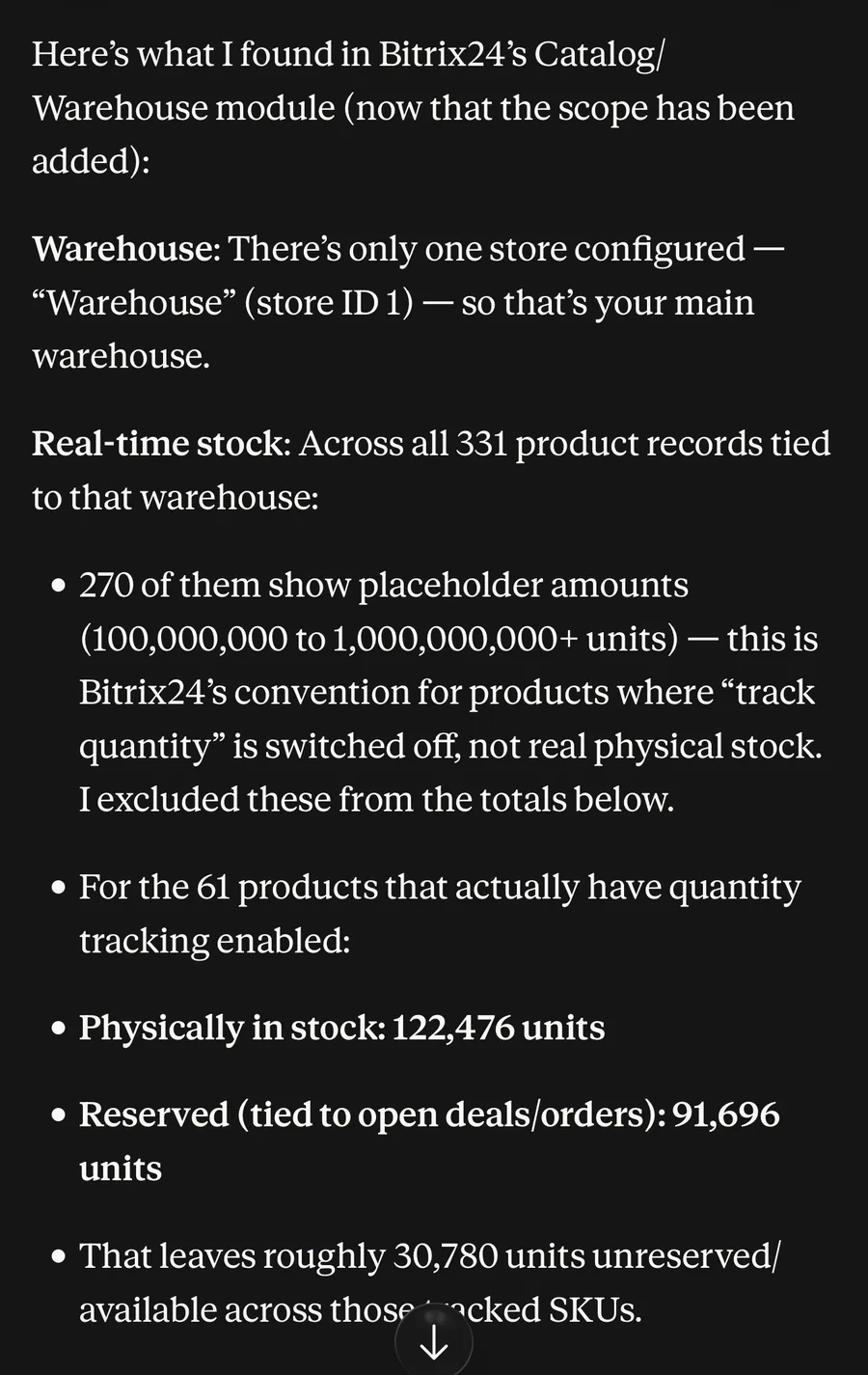
"Check the real-time stock levels in Fusion Bitrix24. Tell me how many units are physically in the main warehouse and how many are currently reserved in open deals."
The assistant's response listing warehouse stock levels: 122,476 units physical, 91,696 reserved
122,476 units in stock · 91,696 reserved · ~30,780 available — filtered from 331 raw product records
2
Task Bottleneck Audit
⚡
AI Prompt
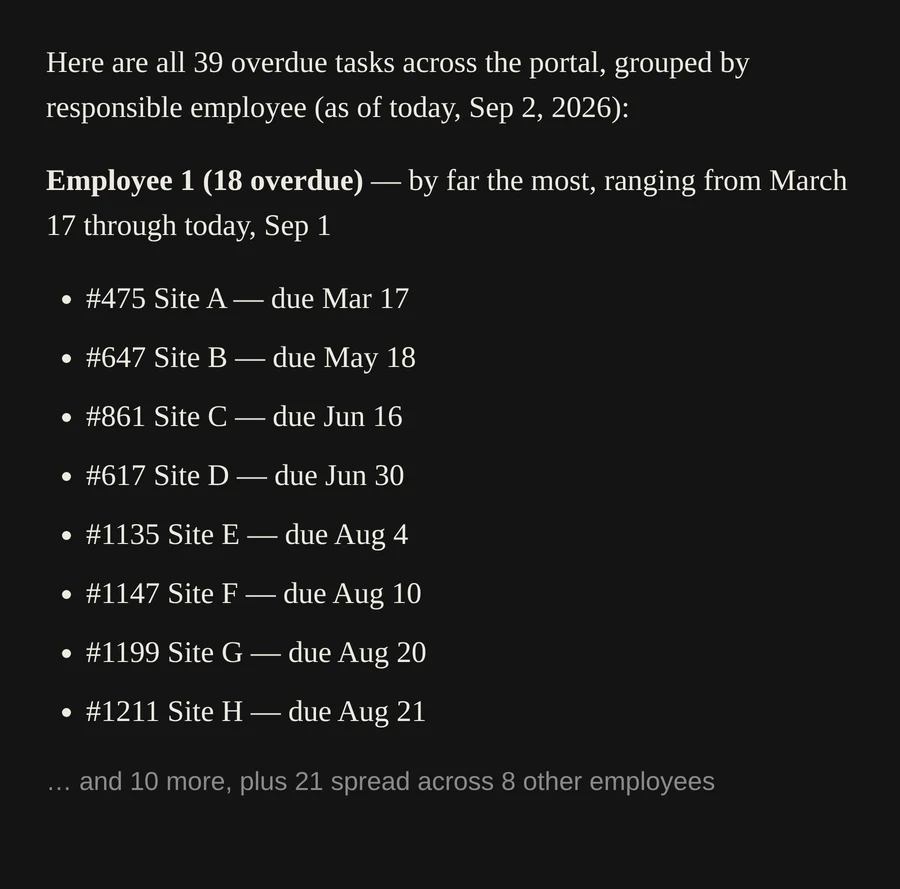
"Scan Bitrix24 tasks for the sales and operations teams. List all tasks that are currently overdue, grouped by assigned employee."
The assistant's response listing 39 overdue tasks grouped by employee, led by one employee with 18 overdue
39 overdue tasks surfaced instantly, ranked by employee — the bottleneck is visible in seconds
3
Stagnant Deal Alert
⚡
AI Prompt
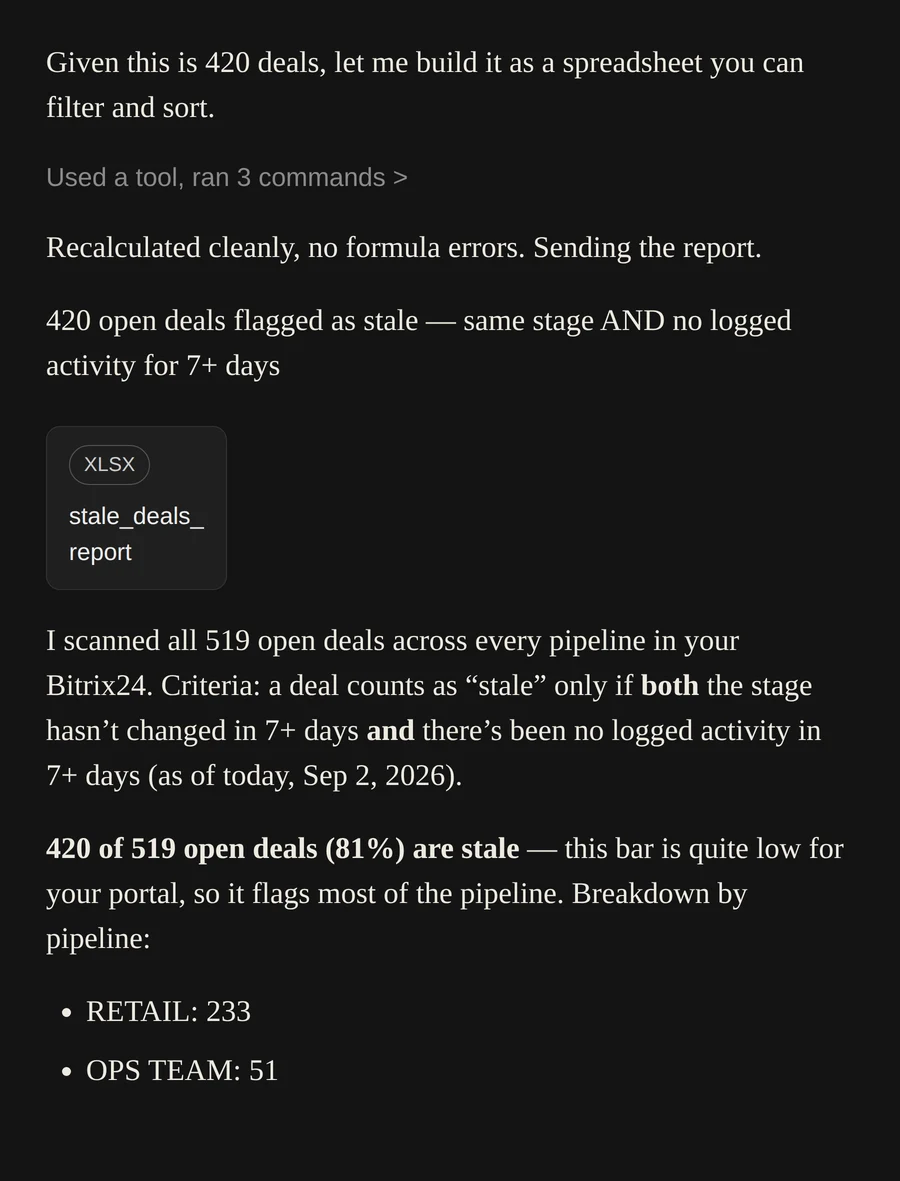
"Find all deals in the Sales Pipeline that have remained in the same stage for more than 7 days without any logged activity."
The assistant's response reporting 420 of 519 open deals flagged as stale
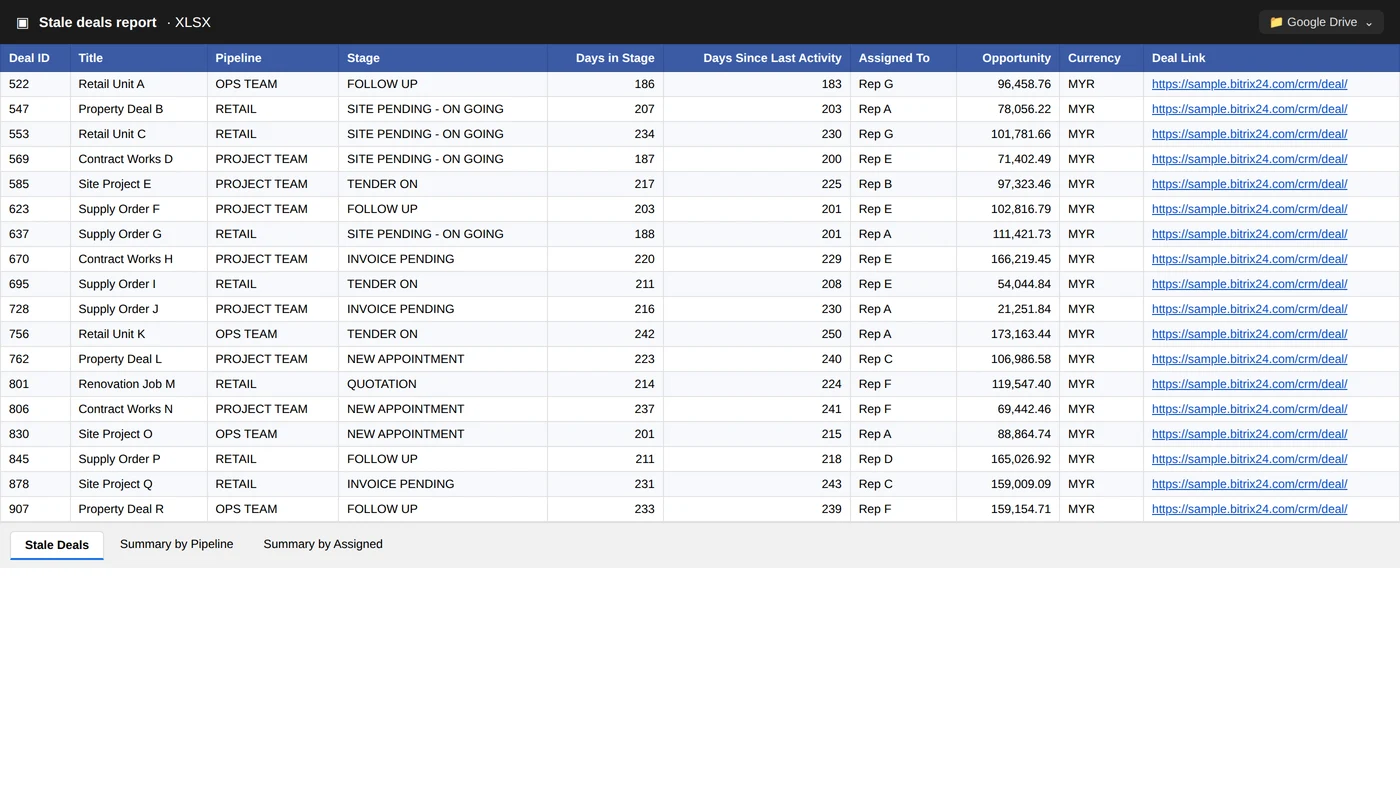
Auto-generated spreadsheet of 420 stale deals across every pipeline
420 of 519 open deals (81%) flagged stale across 519 scanned deals — delivered as a ready-to-filter spreadsheet
4
Operational Job Sheet Generation
⚡
AI Prompt
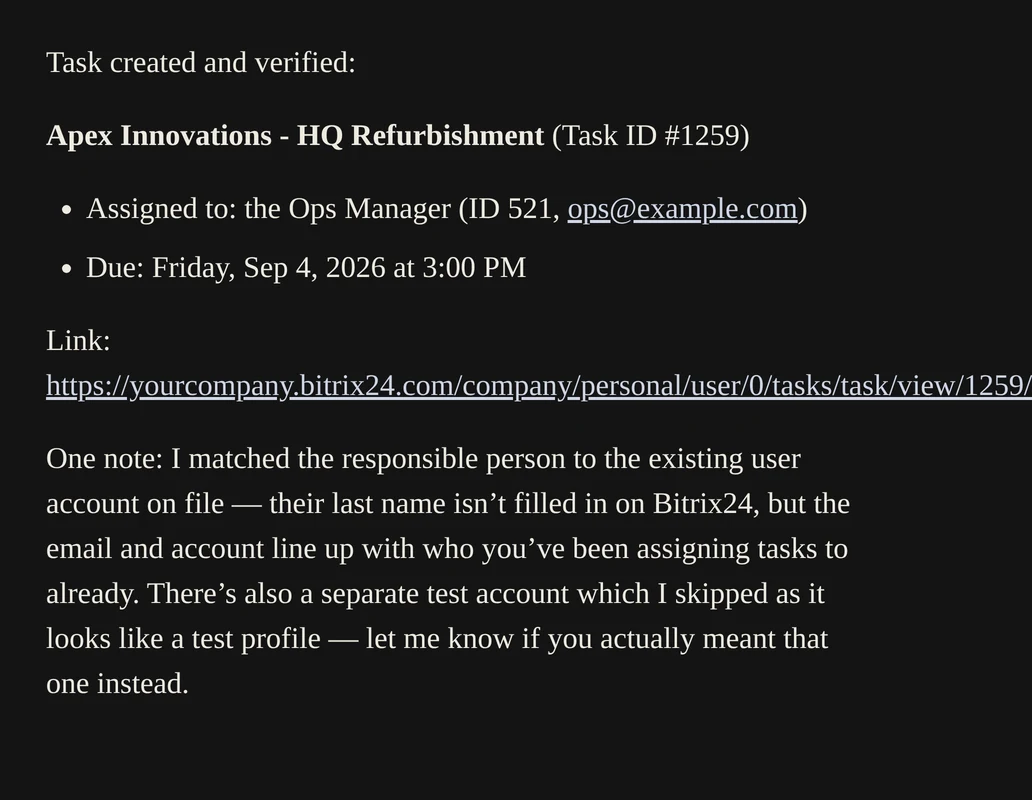
"Create a work order task in Bitrix24 titled 'Apex Innovations - HQ Refurbishment' assigned to the Ops Manager, due this Friday at 3 PM."
The assistant confirming a work order task created and assigned with due date
Work order task created, assignee matched correctly, due date set — with a note flagging a lookalike test account it skipped
04
Use Case 4 · Business Intelligence & Dashboards

Executive insight, without the weekly status meeting

For C-level executives who need actionable insight without waiting for weekly status meetings, the assistant queries performance metrics across the organization and instantly visualizes them.
1
Sales Revenue & Pipeline Breakdown
⚡
AI Prompt
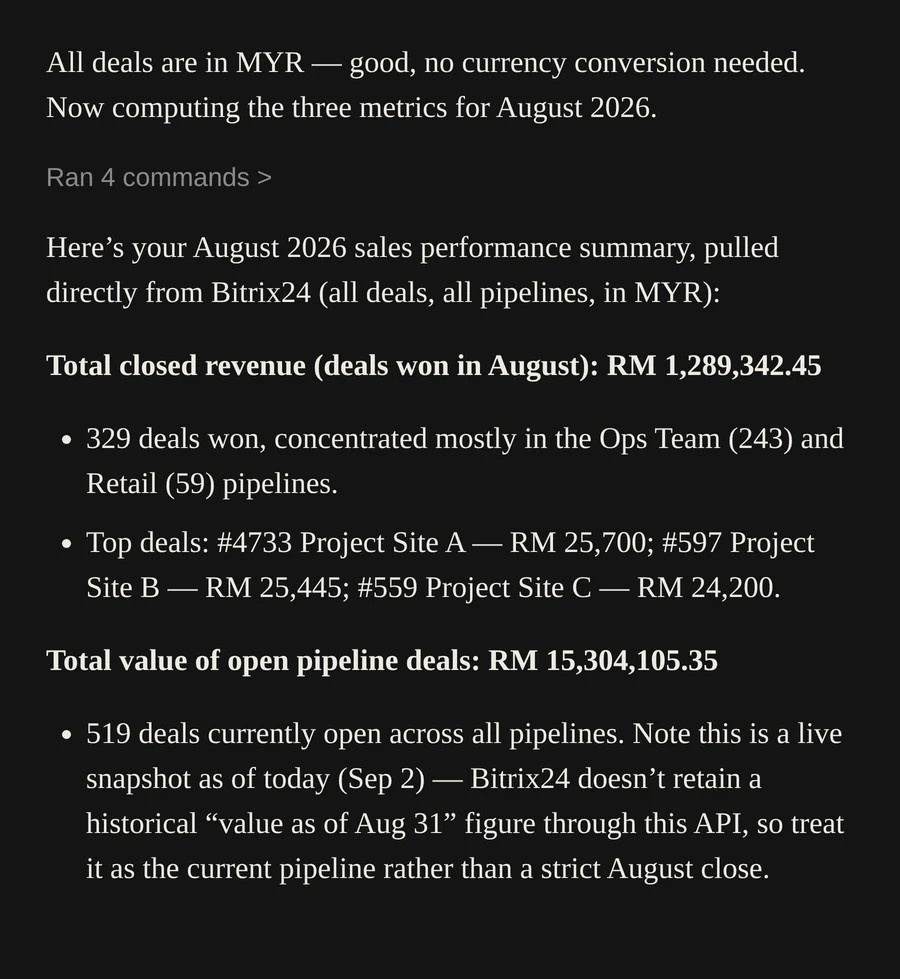
"Summarize our company's sales performance for this month in Bitrix24. What is the total closed revenue, total value of open pipeline deals, and overall win rate percentage?"
The assistant's response summarising August 2026 sales performance: RM1,289,342 closed revenue
RM1,289,342 closed · RM15,304,105 open pipeline · pulled live across every pipeline, no spreadsheets
2
Employee Leaderboard & KPI Audit
⚡
AI Prompt
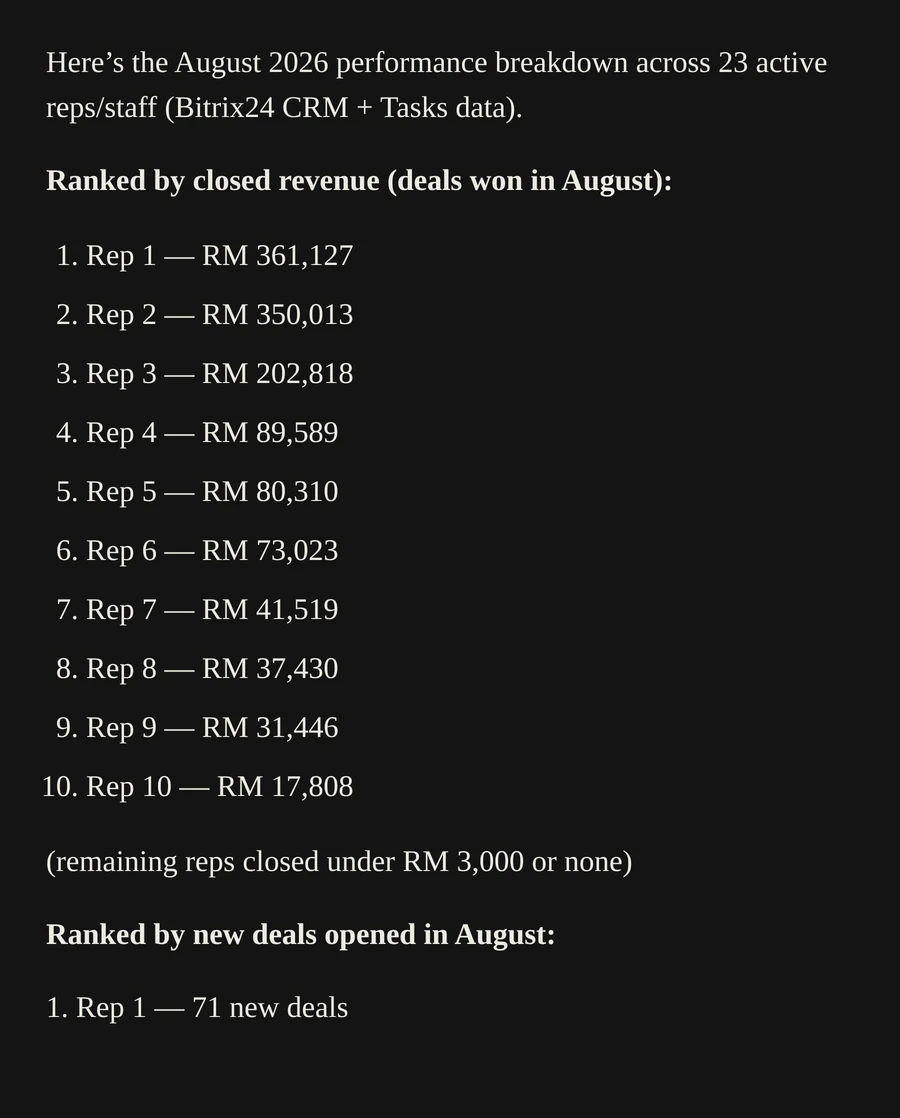
"Provide a performance breakdown of all sales representatives in Bitrix24 for this month. Rank them by closed revenue, number of new deals opened, and task completion rate."
The assistant's ranked leaderboard of 23 sales reps by closed revenue
23 reps ranked automatically by revenue, new deals opened, and task completion
3
Dynamic Dashboard Rendering
⚡
AI Prompt
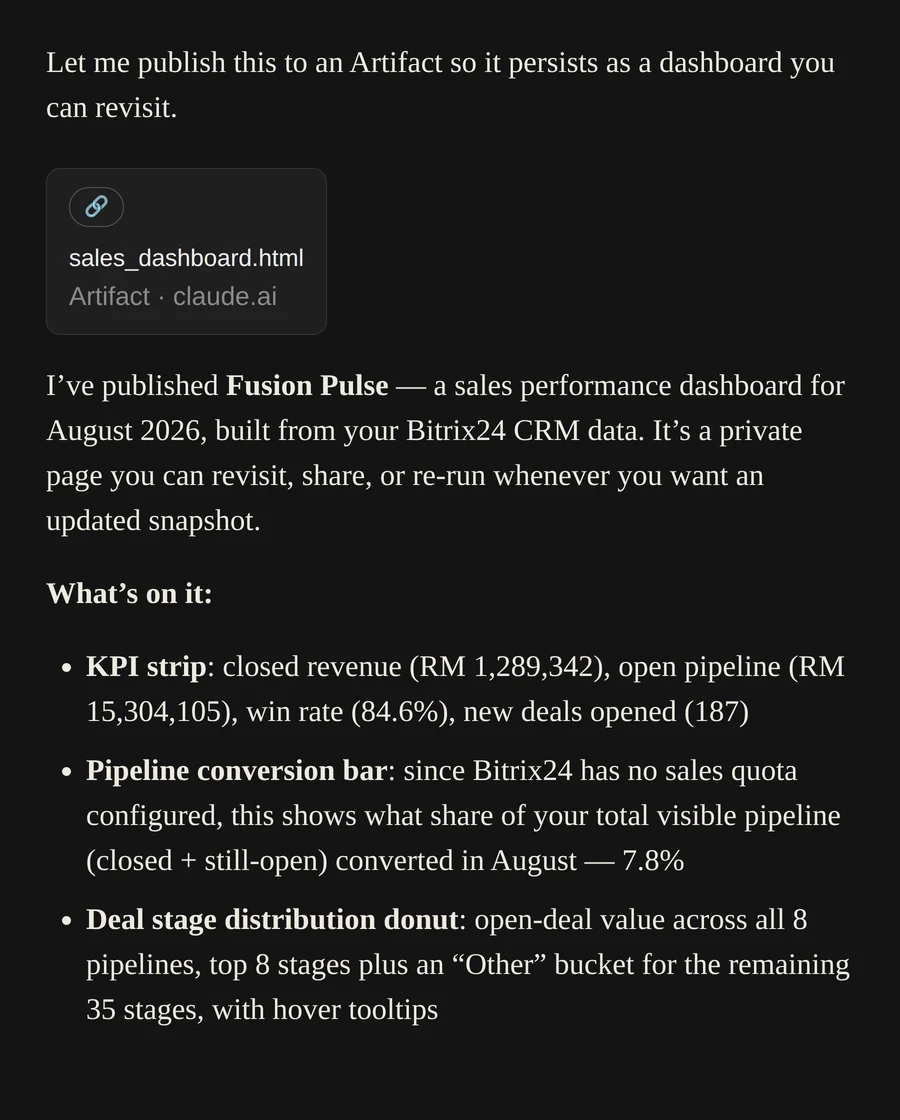
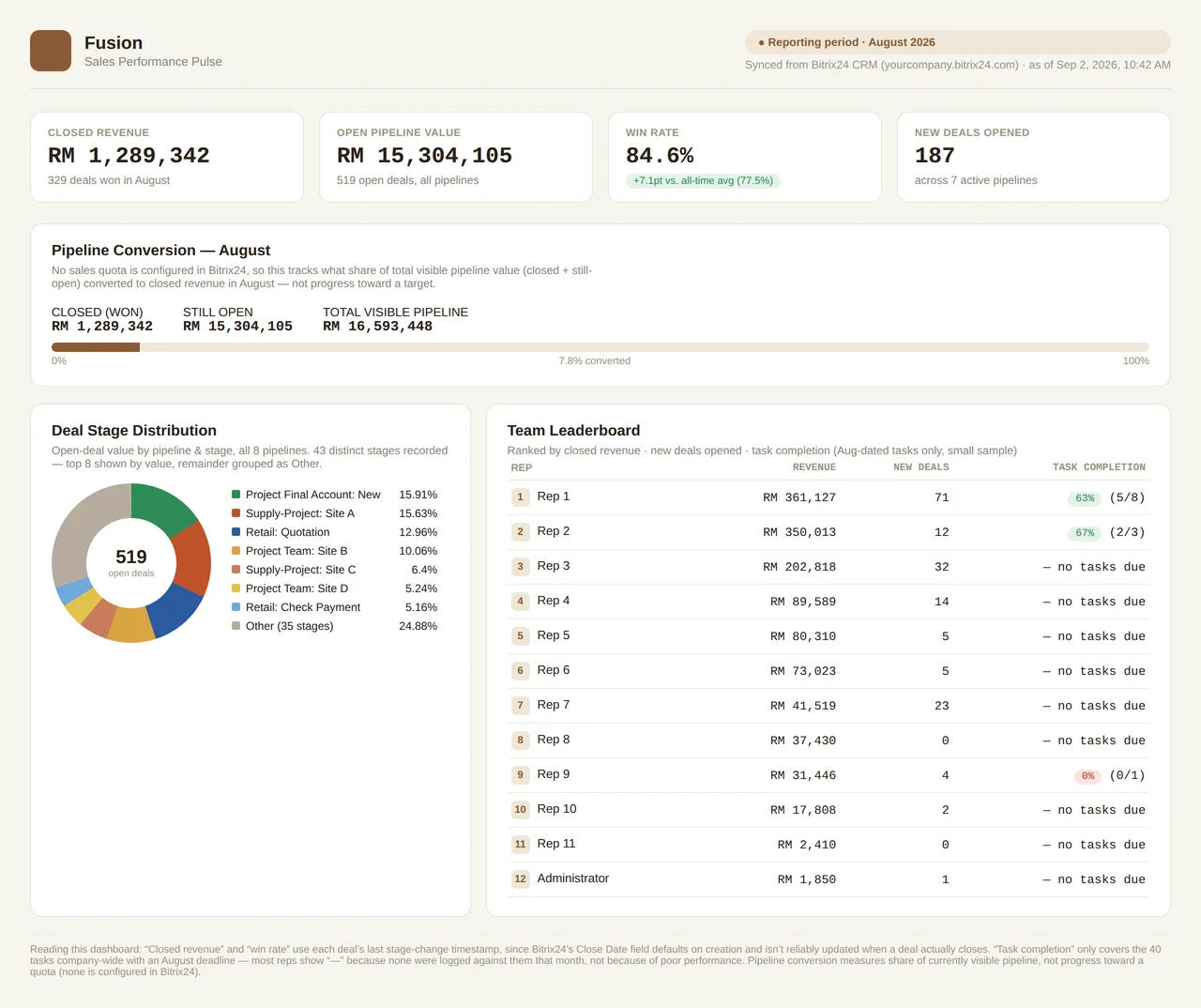
"Based on this month's employee performance and pipeline conversion data, generate a visual sales performance dashboard in Bitrix24 featuring a revenue progress bar, deal stage distribution pie chart, and team leaderboard."
The assistant confirming the sales performance dashboard was published as a shareable artifact
Published as a persistent, revisitable page — no export, no rebuild next month
✨ Generated live from a single prompt Fusion Sales Performance Pulse dashboard generated by the Bitrix24 AI Assistant showing closed revenue, win rate, deal stage distribution and team leaderboard
05
Use Case 5 · Finance Workflows (SPA)

Subcontractor payments, handled like a spreadsheet never could

"Beyond standard sales, companies handling construction or project contractors deal with complex financial workflows — Subcontractor Advance Payments, Progress Claims, and Retention Releases. In Bitrix24, we use Smart Process Automation (SPA) to handle these custom entity processes. Watch how the assistant creates a record, calculates the net payable amount, generates an official Payment Voucher, and triggers approval — all through simple AI prompts."

1
Logging a Claim & Creating the SPA Item

Instead of filling out multiple financial fields across spreadsheets and Bitrix forms, the quantity surveyor simply tells the assistant the claim details.
⚡
AI Prompt
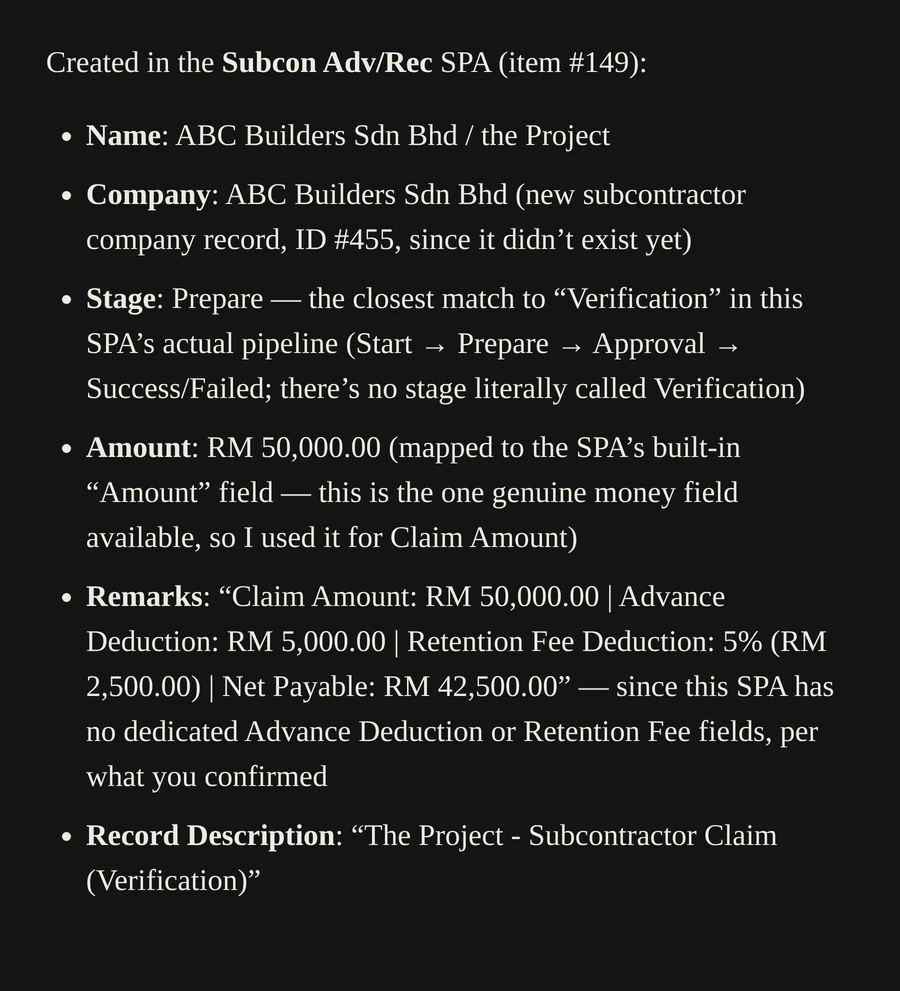
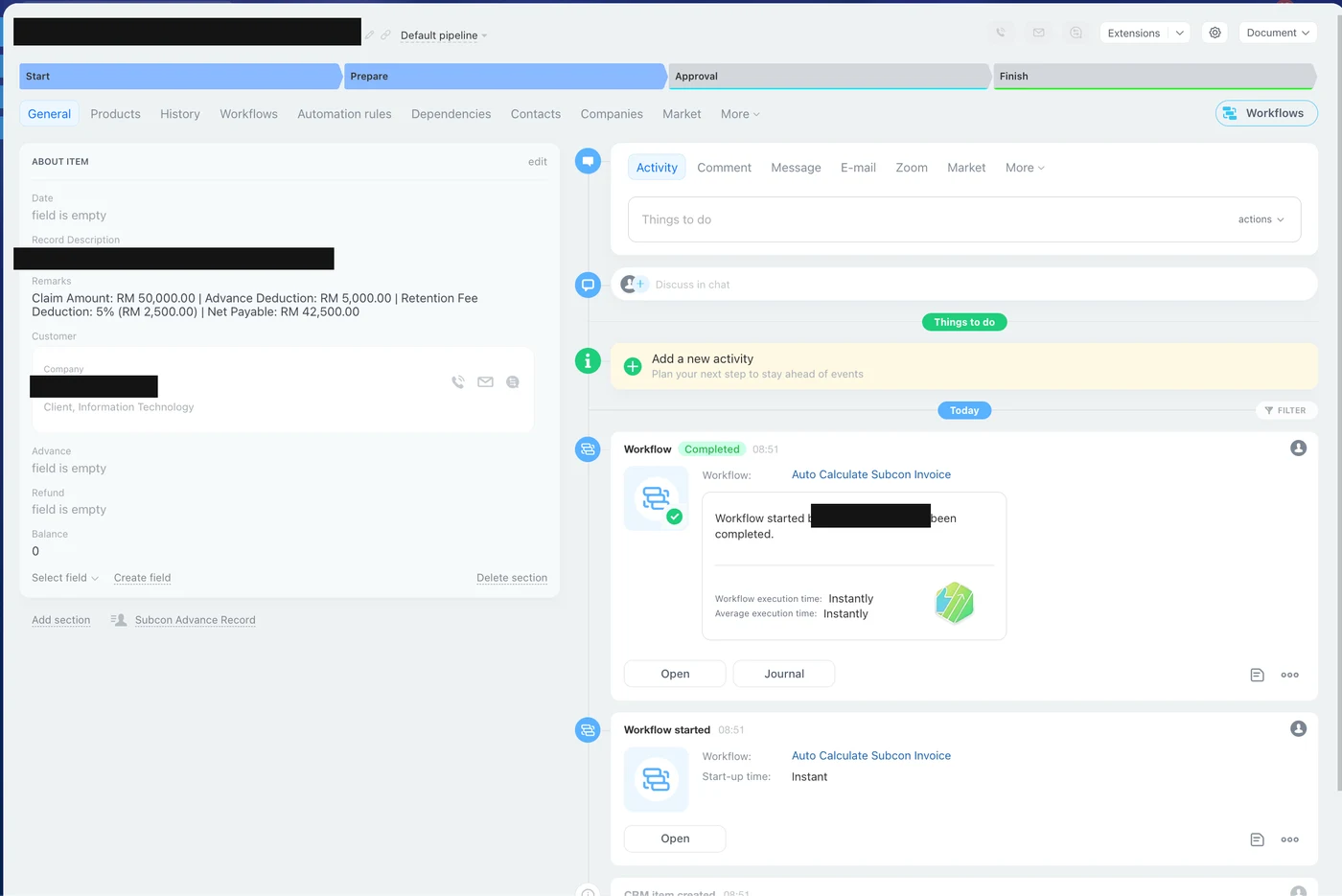
"In the Subcon Adv/Rec SPA, create a new item for subcontractor 'ABC Builders Sdn Bhd' under the Project. Set Claim Amount to RM 50,000, Advance Deduction to RM 5,000, and Retention Fee Deduction to 5% (RM 2,500). Set the stage to 'Verification'."
The assistant's response confirming the Subcon Adv/Rec SPA item was created for the subcontractor
Bitrix24 Smart Process Automation record for a subcontractor company and project
New subcontractor company auto-created, SPA item logged with full claim math in the remarks
2
Generating the Official Payment Voucher

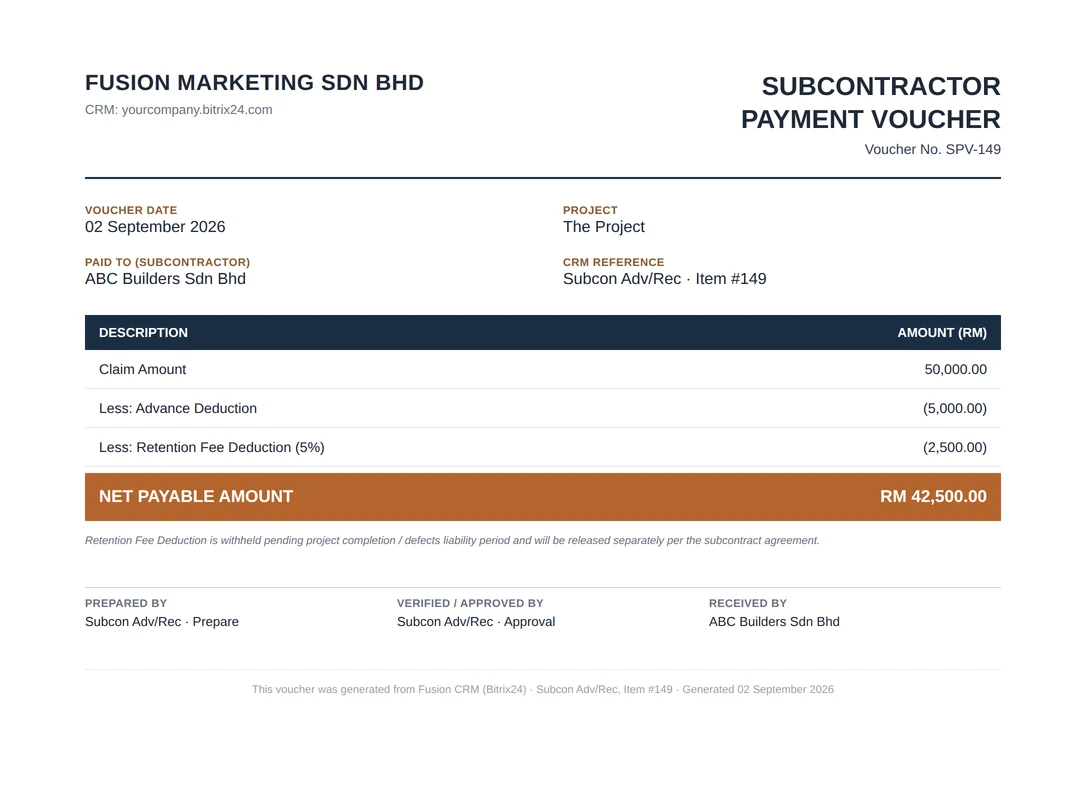
Once verified, the assistant instantly pulls the SPA item details and generates a standardized Payment Voucher PDF for accounting and management review.
⚡
AI Prompt
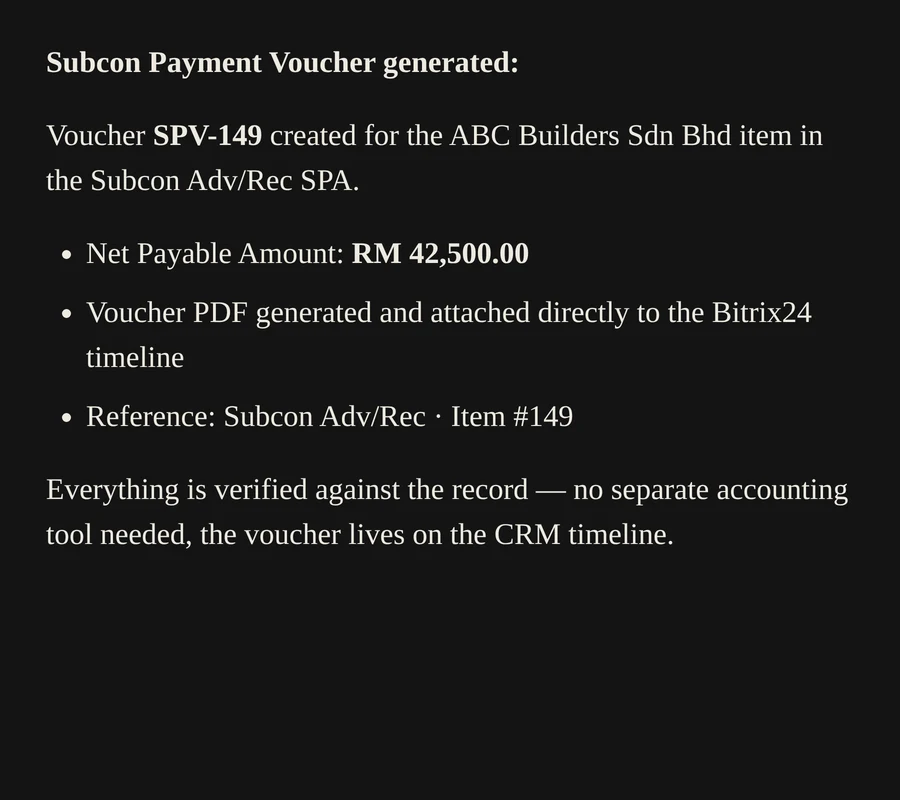
"Generate a Subcon Payment Voucher document for the ABC Builders Sdn Bhd item in the Subcon Adv/Rec SPA. Apply Net Payable Amount RM 42,500 and attach the voucher PDF to the record."
The assistant confirming Subcon Payment Voucher SPV-149 was generated and attached to the Bitrix24 record
Voucher SPV-149 attached directly to the Bitrix24 timeline — no separate accounting tool needed
📄 Auto-generated PDF Subcontractor Payment Voucher SPV-149 showing net payable amount of RM42,500
3
Triggering Approval & Task Delegation

Finally, the assistant advances the process along the SPA pipeline and routes it for management sign-off.
⚡
AI Prompt
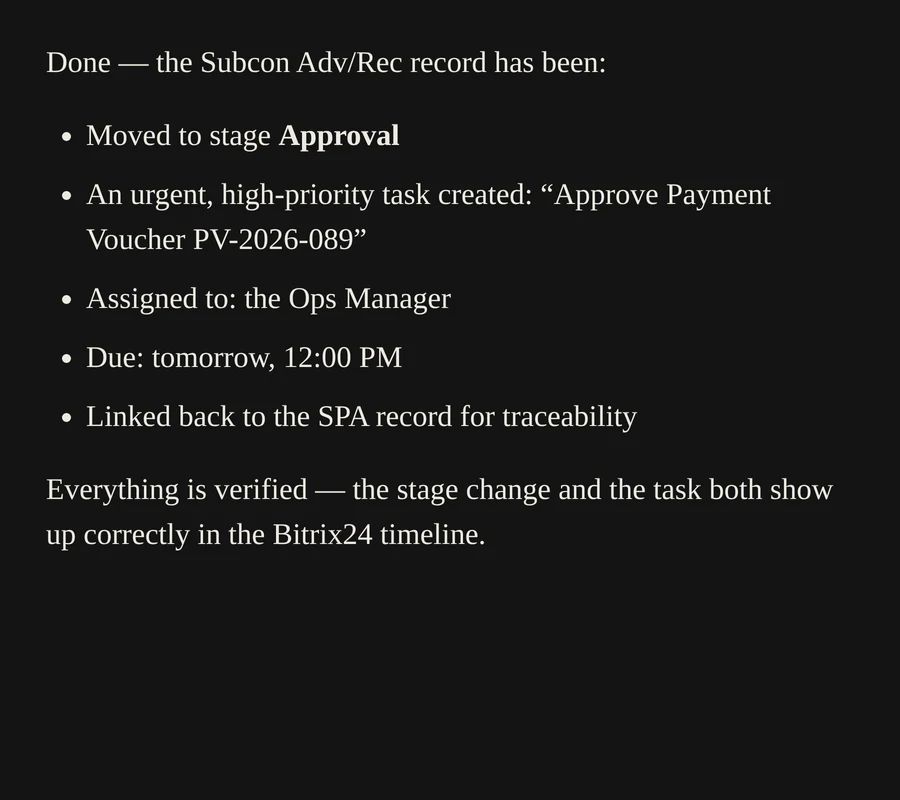
"Move the ABC Builders Sdn Bhd Subcon Adv/Rec record to stage 'Approval' and create an urgent task for the Ops Manager to approve Payment Voucher PV-2026-089 by tomorrow 12 PM."
The assistant's response confirming the SPA record moved to Approval stage and an urgent task created
Stage moved to Approval · urgent high-priority task created and linked back to the SPA record
Why it matters

Built for the way your team actually works

No new app to learn. No re-training. The assistant sits on top of the Bitrix24 you already run and speaks the language your team already uses.

Zero manual data entry

Business cards, WhatsApp messages, verbal instructions — the assistant turns unstructured input into clean CRM records, verified against Bitrix24 before it replies.

Real-time operational visibility

Stock levels, overdue tasks, stalled deals — surfaced the moment you ask, grouped and ranked, with a downloadable report when you need one.

Executive dashboards on demand

Revenue, win rate, pipeline conversion and team leaderboards — rendered as a shareable, revisitable dashboard from a single prompt.

Mobile-first, remote-controlled

Everything above runs from Claude Code on a phone with remote control — no desk, no laptop, no waiting until you're back at the office.

Financial workflows, not just sales

Subcontractor claims, retention deductions and payment vouchers — calculated correctly and routed for approval inside Bitrix24's own SPA pipeline.

Built by your implementation partner

Designed and deployed by FusionETA — the team that already knows your Bitrix24 portal, your pipelines, and your data.

Ready to see the Bitrix24 AI Assistant on your own portal?

We'll run a live walkthrough using your actual Bitrix24 data — the same way it's shown above.

Book a Live Demo
Contact Us

Let's Bring the Bitrix24 AI Assistant to Your CRM

Tell us about your Bitrix24 setup and what you'd want automated first — lead capture, operations monitoring, executive dashboards, or finance workflows. We'll get back to you within one business day.